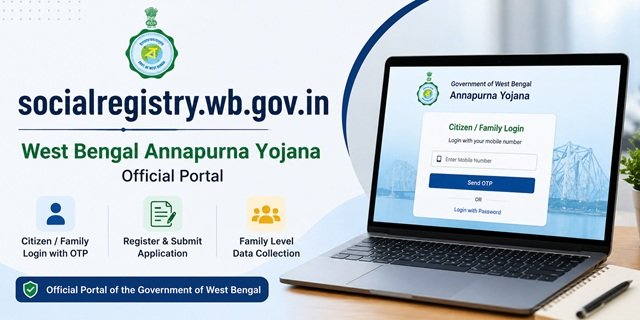
If you searched for socialregistry.wb.gov.in, you are looking for the official West Bengal Annapurna Yojana portal. The full and correct URL is https://socialregistry.wb.gov.in. This portal is built by the National Informatics Centre (NIC) and all content, data, and operations are owned by the Government of West Bengal. The portal title reads: “Government of West Bengal – Annapurna Yojana.” Login requires your mobile number and OTP. As of June 2026, the login interface is live and accessible. Online registration on the portal is now live. The government activated the Family Level Data Collection Portal on 3 June 2026. Both online and offline applications are accepted. The application window closes on 25 August 2026.
socialregistry.wb.gov.in – Is This the Real Portal?
Yes. socialregistry.wb.gov.in is the genuine official portal. Three things confirm this:
- The domain ends in .wb.gov.in – the official Government of West Bengal domain. No genuine government portal uses .com, .org, or .in alone.
- The footer states: “This site is architected and designed by National Informatics Centre (NIC). Content, DATA, Process and Operation owned and maintained by the Government of West Bengal.”
- The portal title clearly reads “Government of West Bengal – Annapurna Yojana” with official branding.
The portal has five live policy pages – Legal Disclaimer at socialregistry.wb.gov.in/legal-disclaimer, Privacy Policy at socialregistry.wb.gov.in/privacy-policy, Copyright Policy at socialregistry.wb.gov.in/copyright-policy, Hyperlink Policy at socialregistry.wb.gov.in/hyperlink-policy, and Terms and Conditions at socialregistry.wb.gov.in/terms-and-conditions. All five are accessible – a hallmark of a fully deployed official government portal.
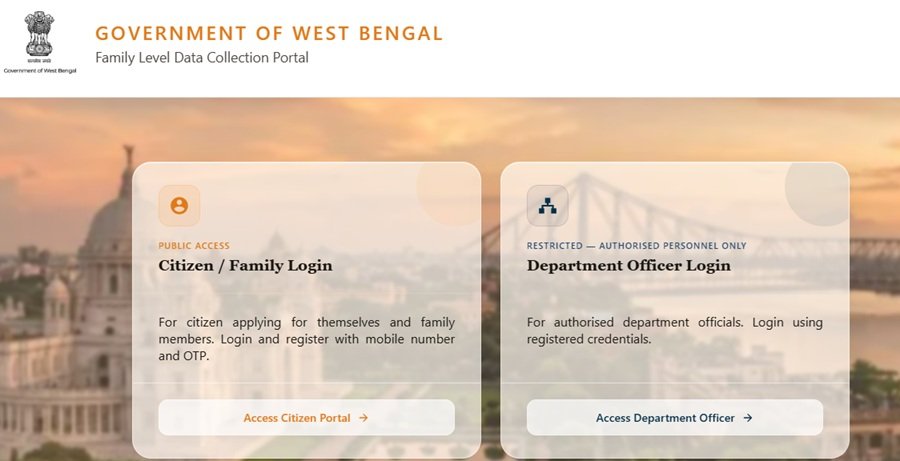
socialregistry.wb.gov.in Login – Step by Step
The login page at socialregistry.wb.gov.in currently shows:
- Go to socialregistry.wb.gov.in on your phone or computer.
- Enter your mobile number in the login field.
- Click Send OTP. A one-time password is sent to your mobile.
- Enter the OTP received. You are logged in.
- If you have a password set up and need to reset it, use the Forgot Password option at socialregistry.wb.gov.in/forget-password.
How to Submit Annapurna Yojana Application on socialregistry.wb.gov.in?
Eligible applicants can submit their information through the Family Level Data Collection Portal available on socialregistry.wb.gov.in by following the steps given below:
Step 1: Visit the official portal at socialregistry.wb.gov.in.
Step 2: Click on Citizen / Family Login.
Step 3: Select your district from the dropdown list.
Step 4: Enter your registered mobile number and click on Request OTP.
Step 5: Complete OTP verification and log in to the portal.
Step 6: Fill the Basic Information section, including name, date of birth, gender, category, Aadhaar number, voter card details, and bank account information.
Step 7: Complete the Ration Card / Food Subsidy section.
Step 8: Provide details under Assets, Income / Profession, and Identity Documents.
Step 9: Enter information about government scheme benefits already received by the family.
Step 10: Add all family members under the Family Identity section.
Step 11: Complete the declaration and consent section.
Step 12: Review all details carefully and submit the application.
The mobile number you use should be the one linked to your Aadhaar card or the one registered with your existing Lakshmir Bhandar account. Keep this number active and ensure it receives SMS.
What is the Citizen Portal Link on socialregistry.wb.gov.in
Many users search for socialregistry.wb.gov.in/citizen or socialregistry.wb.gov.in/citizen/#/form. The citizen-facing section of the portal is accessible after logging in with your mobile OTP. Once logged in, the citizen dashboard shows available services. The direct citizen URL structure may change as the portal activates its registration module – always start from socialregistry.wb.gov.in and navigate from there after login.
Annapurna Yojana Online Registration Status on socialregistry.wb.gov.in
The Government of West Bengal has activated the Family Level Data Collection Portal through socialregistry.wb.gov.in for Annapurna Yojana. Eligible women can now access the Citizen / Family Login module using their registered mobile number and OTP to submit family-level information required for scheme verification and enrolment.
The portal collects detailed information related to the applicant, family members, ration card, income, assets, identity documents, and government scheme benefits. Applicants should keep all required documents ready before starting the registration process.
- Existing Lakshmir Bhandar beneficiaries are being migrated to Annapurna Yojana.
- New applicants can access the Family Level Data Collection Portal through socialregistry.wb.gov.in.
- Applicants must complete all mandatory sections before final submission.
- Mobile OTP verification is mandatory for login.
How to Check Application Status on socialregistry.wb.gov.in
After submitting the Annapurna Yojana application, check your current status by following these steps.
- Go to socialregistry.wb.gov.in and click Access Citizen Portal.
- Select your district from the dropdown list.
- Enter your registered mobile number and click Send OTP.
- Enter the OTP and log in. Your application dashboard opens.
- Scroll down to view your current application status.
The portal shows one of three statuses:
- Application Approved: Your application has cleared verification. Rs. 3,000 will be credited to your Aadhaar-linked single-holder bank account on the next disbursement date. If approved but payment has not arrived, check that your Aadhaar is seeded to your bank account and the account is active.
- Application Rejected: Your application did not pass verification. The portal may not show the full reason. Visit your nearest BDO office (rural), SDO office (urban), or KMC municipal office (Kolkata) with your Temporary Application ID to find out the specific reason and whether you can reapply before 25 August 2026.
- Payment Failure: Your application was approved, but the Rs. 3,000 could not be credited. This usually happens when Aadhaar is not seeded to the bank account, the account is inactive, or a joint account was submitted. Visit your bank branch to get Aadhaar seeding done, then go to the BDO or SDO office with your Application ID and passbook.
Why Applications Get Rejected and What to Do Next
The West Bengal government confirmed five reasons behind the 26 lakh rejections. Find yours and act before 25 August 2026.
- Citizenship or residency not verified: Visit BDO (rural) or SDO (urban) with Aadhaar, Voter ID, ration card, and any proof of long-term West Bengal residency. If eligible, reapply with correct documents.
- Name deleted from voter rolls during SIR 2026: If you have a pending CAA tribunal case, the government has confirmed you remain eligible. Carry your CAA receipt and tribunal acknowledgement to the BDO or SDO office immediately. If no CAA case, ask the officer about electoral roll restoration.
- Government employee or pensioner in family: No appeal route exists. This is a firm eligibility exclusion.
- Income tax return filed: No appeal route exists. Income tax filers are outside the scheme’s eligibility.
- Document error or mismatch: Wrong Aadhaar number, wrong bank account, wrong IFSC, joint account submitted, or name mismatch. Visit the BDO or SDO office with your Temporary Application ID and correct documents. Officers can fix errors through administrative login, subject to government guidelines.
Do not submit a second application while your first is still under review or correction. Duplicate entries cause system conflicts and delay your case further.
You can reapply online at socialregistry.wb.gov.in, at BDO or SDO offices, at municipality offices, or at Janakalyan Shibir camps running across all districts.
Before reapplying, verify your Aadhaar is seeded to your bank account at myaadhaar.uidai.gov.in. DBT payments only reach Aadhaar-linked single-holder accounts. If seeding is missing, visit your bank branch. It is free and activates in 2 to 3 working days.
How to Correct Mistakes in the Annapurna Yojana Application
There is currently no online self-edit facility on socialregistry.wb.gov.in after final submission. All corrections must be done through the BDO office (rural), SDO office (urban), or KMC municipal office (Kolkata). All corrections must be completed before 25 August 2026. Many applicants face issues after submission, such as spelling mistakes, wrong Head of Family, missing Voter ID, or address mismatch. The following guidance covers the most common correction queries.
Spelling Mistake in Name or Details
If there is a spelling mistake in the name or other personal details submitted on socialregistry.wb.gov.in, the applicant must visit the nearest BDO office in rural areas or SDO office in urban areas with the correct supporting documents. The concerned officer will initiate the correction process on the portal after document verification.
Voter ID Not Available
Voter ID is mandatory for the Annapurna Yojana application. Applicants who do not have a Voter ID can not submit its application form.
Head of Family Details Incorrectly Filled
The Family Level Data Collection Portal on socialregistry.wb.gov.in collects complete family data for verification purposes. If any family member details were incorrectly entered as Head of Family during the application process, the applicant must visit the nearest BDO office in rural areas or SDO office in urban areas with correct supporting documents, such as Aadhaar Card and Voter ID to request correction before the application is processed.
Who Can Be the Head of the Family
Annapurna Yojana is an individual benefit scheme. Every eligible woman in a household can apply separately and receive Rs. 3,000 per month individually. The scheme is not restricted to one woman per family. Each applying woman fills her own individual application with her personal details. The bank account entered in the application must be in the name of the applying woman herself and must be linked to her own Aadhaar Card for DBT payment.
Address Mismatch in Documents
If the address mentioned in the application does not match the address in the Aadhaar Card or other submitted documents, the application may face verification issues. Applicants must ensure that the address entered on the portal matches exactly with the address on the Aadhaar Card. For correction, visit the nearest BDO or SDO office with the correct address proof documents for verification and updation on the portal.
Important: All corrections must be completed well before the 90-day application window ends, approximately on 29 August 2026. Applicants must not wait until the last date to resolve correction issues.
How to Check Annapurna Yojana Payment Status
After your application is approved, payment reaches your Aadhaar-linked bank account through DBT. To check whether the Rs. 3,000 has been credited:
- Update your bank passbook at the branch or passbook printing kiosk.
- Check recent transactions through ATM, mobile banking, internet banking, or SMS banking.
- Log in to socialregistry.wb.gov.in and check your dashboard for payment status.
- If payment has not arrived despite an Approved status, verify your Aadhaar-bank seeding at myaadhaar.uidai.gov.in. If seeding is missing, visit your bank branch and request it. Then visit your BDO or SDO office with your Application ID and passbook.
Annapurna Yojana Verification on socialregistry.wb.gov.in
Users searching for the Annapurna Yojana verification portal or the Annapurna Yojana verification official website – the verification of beneficiary status happens through socialregistry.wb.gov.in after login. To verify:
- Go to socialregistry.wb.gov.in
- Log in with your mobile OTP
- Check your beneficiary status and application details from your dashboard
For payment verification of the Rs. 3,000 monthly amount already being paid to Lakshmir Bhandar-migrated beneficiaries, use socialsecurity.wb.gov.in.
Government of West Bengal Family Level Data Collection Portal
Some users search for “Government of West Bengal family level data collection portal” and land on socialregistry.wb.gov.in. This is because the Social Registry platform underlying this portal was designed as part of a broader West Bengal Social Registry project – a family-level data system that maps household details, income, and welfare eligibility across the state. The Annapurna Yojana is the first major scheme being delivered through this registry platform.
What Information Does socialregistry.wb.gov.in Collect?
The Family Level Data Collection Portal has been designed to create a verified social registry of eligible households in West Bengal. During the registration process, applicants may be required to provide the following information:
- Personal and demographic details.
- Aadhaar and voter card information.
- Ration card details.
- Bank account information.
- Income and profession details.
- Household asset information.
- Family member details.
- Existing government scheme benefits.
- Identity documents and supporting records.
Official Links
- Annapurna Yojana Portal – socialregistry.wb.gov.in
- Forgot Password – socialregistry.wb.gov.in
- Privacy Policy – socialregistry.wb.gov.in
- Legal Disclaimer – socialregistry.wb.gov.in
- Payment Status Portal – socialsecurity.wb.gov.in
- Bangla Sahayata Kendra – bsk.wb.gov.in
Frequently Asked Questions
Q. What is socialregistry.wb.gov.in?
socialregistry.wb.gov.in is the official West Bengal Annapurna Yojana portal built by NIC (National Informatics Centre). The portal title is “Government of West Bengal – Annapurna Yojana.” It uses mobile OTP-based login and is the primary digital platform for the Annapurna Yojana scheme in West Bengal.
Q. How do I log in to socialregistry.wb.gov.in?
Go to socialregistry.wb.gov.in, enter your mobile number, click Send OTP, and enter the OTP received. If you need to reset your password, use the Forgot Password link at socialregistry.wb.gov.in/forget-password.
Q. Has the Annapurna Yojana registration started on socialregistry.wb.gov.in?
The portal is live and login works. The government set 1 June 2026 as the target date for online registration. The public application module is not yet fully confirmed as open. Existing Lakshmir Bhandar beneficiaries are auto-migrated and do not need to register. New applicants should apply offline at BDO/SDO offices in the meantime.
Q. What is the citizen portal link on socialregistry.wb.gov.in?
After logging in at socialregistry.wb.gov.in with your mobile OTP, you access your citizen dashboard. The URL path may include /citizen or /citizen/#/form once the registration module is active. Always start from the homepage socialregistry.wb.gov.in and navigate after login.
Q. I am searching for social registry gov in – is it the same as socialregistry.wb.gov.in?
Yes. People search for “social registry gov in”, “social registry wb gov in”, “socialregistry.gov.in”, and similar variations – all refer to the same official portal at socialregistry.wb.gov.in. The correct and complete URL is https://socialregistry.wb.gov.in.
Q. What is the difference between annapurna bhandar portal and socialregistry.wb.gov.in?
Annapurna Bhandar is the scheme name (it replaced Lakshmir Bhandar). socialregistry.wb.gov.in is the official online portal for this scheme. Some people also call it the Annapurna Bhandar portal login page – both refer to the same thing.
Q. I am an existing Lakhshmi Bhandar beneficiary. Do I need to register on socialregistry.wb.gov.in?
No. Existing active Lakhshmi Bhandar beneficiaries are automatically migrated to Annapurna Yojana. Your Rs. 3,000 monthly payment started on 1 June 2026. Check payment status at socialsecurity.wb.gov.in. You only need socialregistry.wb.gov.in if you are applying fresh as a new beneficiary.
Q. What is the Annapurna Yojana verification official website?
socialregistry.wb.gov.in – log in with your mobile OTP to verify your beneficiary status. For payment verification of Rs. 3,000 monthly amount, use socialsecurity.wb.gov.in.
Q. Can I apply for Annapurna Yojana through socialregistry.wb.gov.in?
Yes. Eligible applicants can access the Family Level Data Collection Portal through socialregistry.wb.gov.in and submit the required information after completing mobile OTP verification.
Q. What information is required on the Family Level Data Collection Portal?
Applicants may need to provide personal details, Aadhaar information, bank account details, ration card information, income details, asset information, government scheme details, and family member information.
Q. How do I add family members on socialregistry.wb.gov.in?
After logging into the portal, applicants can use the Family Identity section to add and manage details of family members before final submission.

Tabassum is a government schemes researcher and writer with 5 years of experience tracking Central and State welfare scheme programmes across India. She has covered 500+ schemes spanning agriculture, women welfare, education, and housing, helping lakhs of beneficiaries understand their entitlements in simple language.